Skills
A skill is a set of instructions, with optional supporting files, that tells an agent how to carry out a specific kind of task. An agent loads a skill only when a task needs it. Users can also use skills directly in a conversation if the agent supports this.
Skills live in the Public folder of DIAL file storage. Administrators create and manage them in Artifacts > Skills in DIAL Admin: creating, editing and organizing them in folders.
Skills can also arrive when users publish them (see Review and approve publications). A published skill is a copy placed in the Public folder, and the user's original stays in their private space. Published skills appear in the Skills list alongside the ones administrators create.
Skill file format
A skill is a folder of files. DIAL Core requires a SKILL.md file at the root of the folder. It must start with YAML frontmatter between --- lines, with a non-empty name and description (version is optional), followed by the instructions in Markdown. DIAL Core doesn't check the other files of the skill.
---
name: email-composer
description: This skill triggers whenever you need to compose a business email.
---

Your instructions in Markdown…
Limits
By default, a skill can contain up to 100 files. A single file can be up to 1 MB, and all files together up to 16 MB. DIAL Core rejects an upload that exceeds a limit. These are defaults of the
complexResourcesetting in DIAL Core, so your deployment may use different values.
Main screen
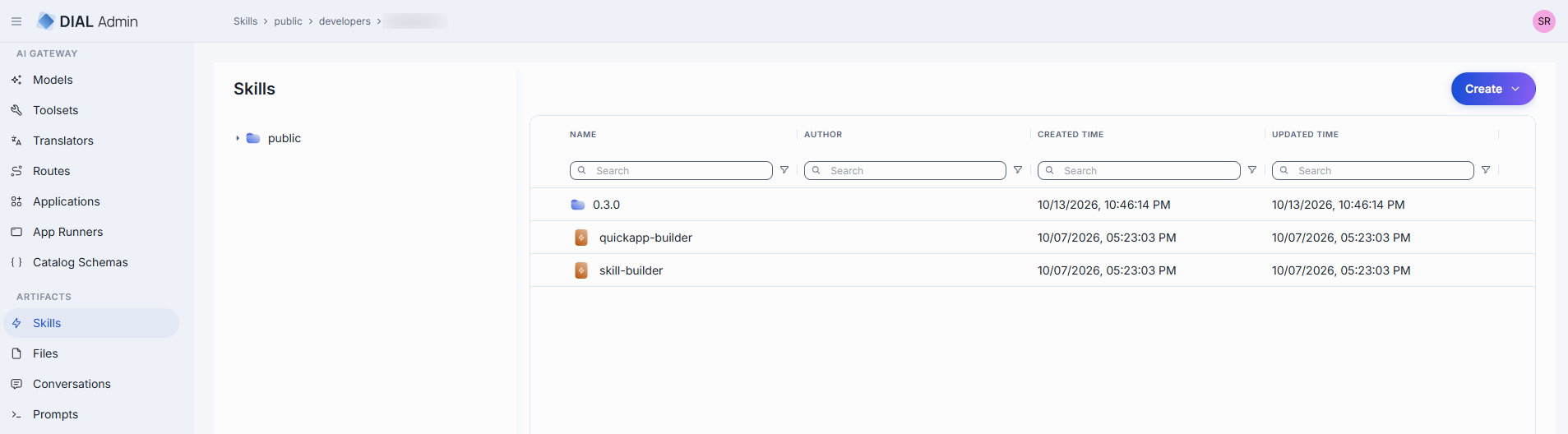
The main screen shows the skills and folders of the Public folder as a tree. The grid shows the name, author, and creation and update times. Skills can be grouped in folders, and a folder can contain skills or further folders.
The Create menu in the toolbar offers Folder and Skill. Import, export and moving a skill from the list are not available.
Row actions include Open in a new tab and Delete. Select several rows to use the bulk Delete.
Folder actions: the tree has no context menu for folders. Create a folder with Create > Folder, and delete it with Delete in its row. Deleting a folder deletes the skills inside it. You can't rename a folder or move it from the list. To set who can access a folder, use Folders Storage.
Create
-
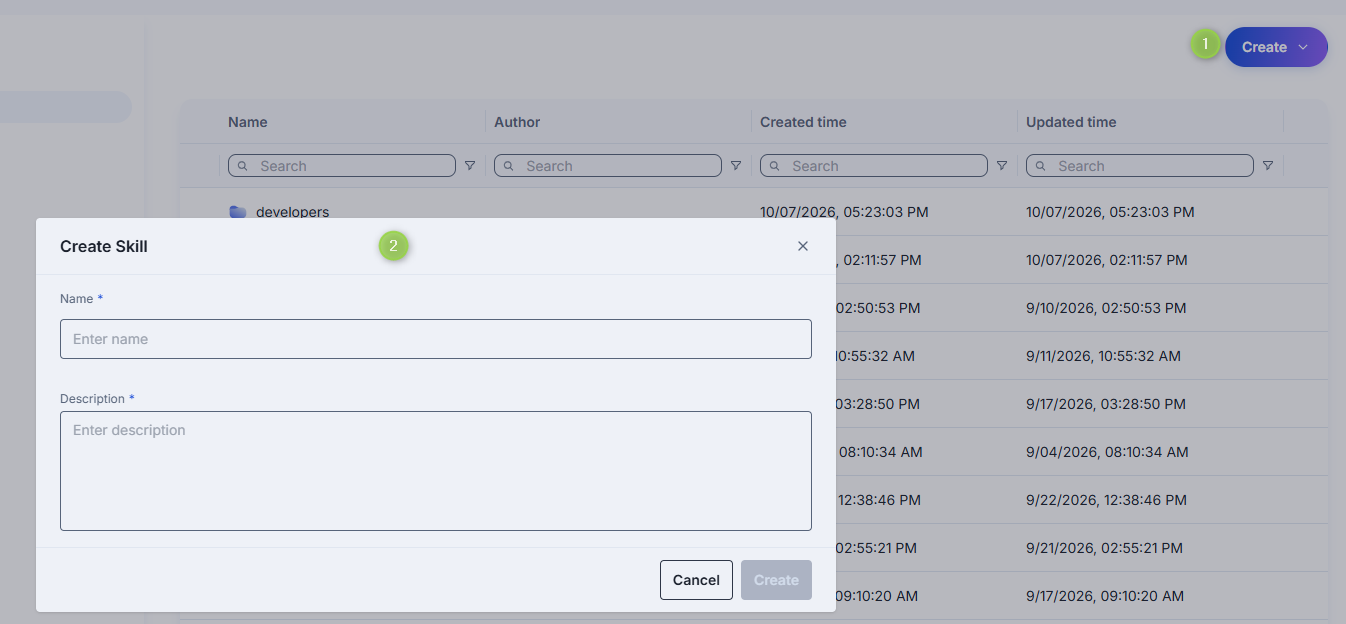
Select the target folder, click Create in the toolbar, and select Skill. You can also select Folder to add a nested folder for a new skill.
-
Define the skill parameters:
Field Required Description Name Yes Name of the skill. Use only lowercase letters, digits and hyphens. It must be unique in the folder. Description Yes What the skill does and when to use it. -
Click Create. DIAL Admin creates the skill with a
SKILL.mdfile that has the name and description as its frontmatter, and the skill configuration screen opens.
Configure
Click any skill to open its configuration screen.
Properties
In properties, you can define the location of the skill in the public folder and manage the skill files.
| Property | Description |
|---|---|
| Path | A path to the skill in the public folder in the DIAL file system. |
| Updated Time | Timestamp of the last update. |
| Creation Time | Creation timestamp. |
| Folder Storage | A folder where the skill is located. Select another folder to move the skill when you save. |
| Files | Files of the skill, including SKILL.md. You can preview and download a file, add files, and remove files. SKILL.md can't be removed. |
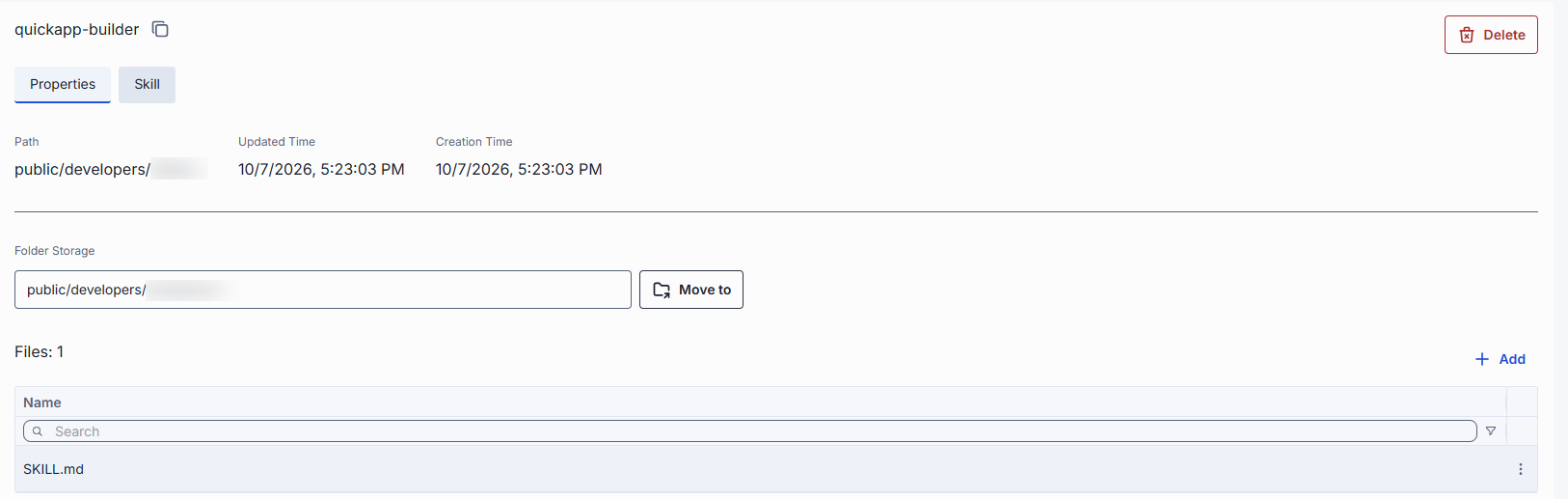
Changes to the files and to Folder Storage are staged until you click Save in the header. Discard reverts them without contacting DIAL Core. Files you add must stay within the limits.
Skill
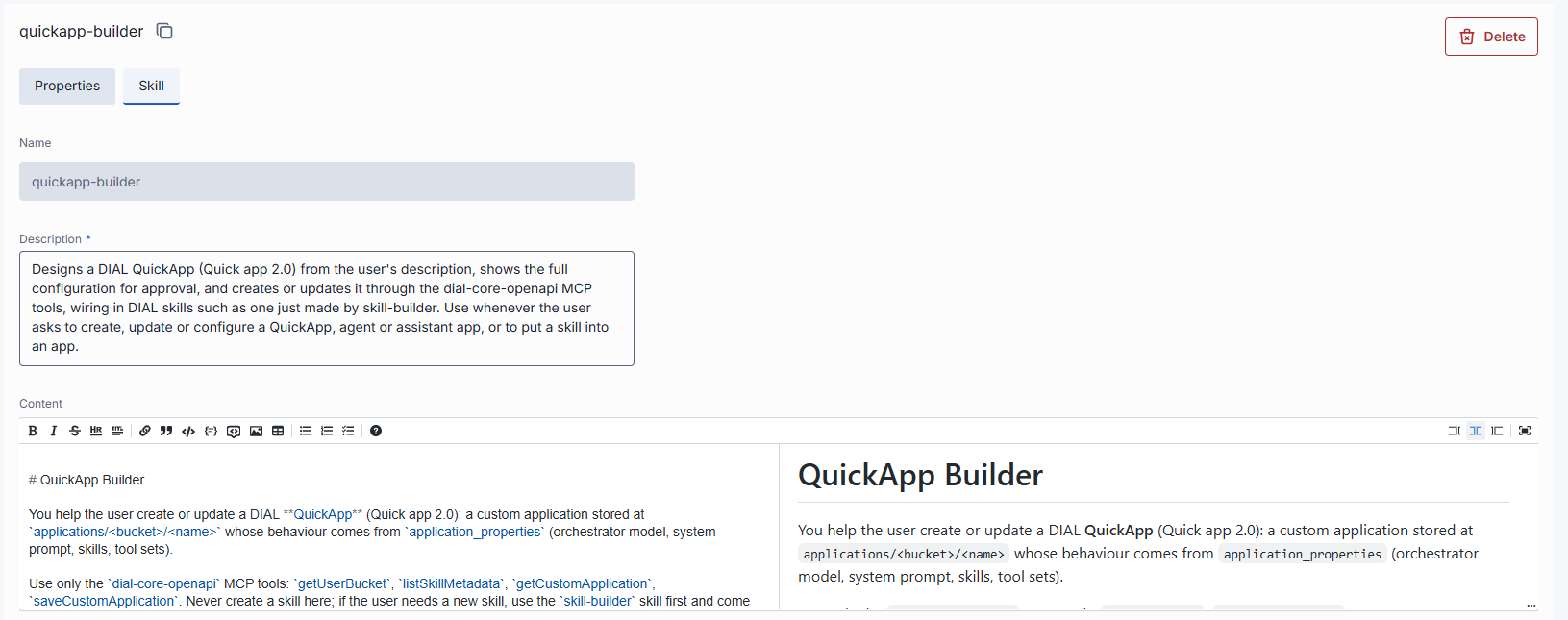
In the skill tab you can define the content of the skill: its name, description and the instructions.
- Name is shown for reference and can't be edited. The identity of a skill is its path.
- Description is editable and required.
- Content is the Markdown of the instructions, the part of
SKILL.mdafter the frontmatter. You edit it in a Markdown editor with a formatting toolbar and a live side-by-side preview. Drag the bar below the editor to resize it.
Edits are staged until you click Save. Save combines the frontmatter and the content into SKILL.md. If DIAL Core rejects the file, for example because the frontmatter is invalid, an error is shown and your changes stay in the editor. Discard reverts the changes.
Delete
You can delete a skill in any of these ways:
- Click Delete on the skill's properties screen.
- Open the row's actions menu and select Delete.
- Select several rows and use the bulk Delete.
The action removes the skill from the public folder.
Warning
Deleting a folder deletes every skill and nested folder inside it. If a delete fails partway through a folder, the operation stops and nothing after the failure is deleted.
Note
Be aware, that removing a skill may break any workflow that uses the deleted skill.
Further reading
- DIAL Admin: Conversations — review published conversations
- DIAL Admin: Prompts — manage shared prompts
- Files — manage shared files
- Approvals — review, approve, and decline publication requests
- Folder Permissions — how the Public folder tree controls who sees shared items