DIAL Overlay
DIAL Overlay is a TypeScript library that embeds DIAL Chat inside external web applications through an iframe and a postMessage-based communication protocol. If you need conversational AI capabilities in your product without building a chat UI from scratch, Overlay gives you a drop-in component with programmatic control over conversations, system prompts, and events.
When to use Overlay
| Approach | Best for | Trade-off |
|---|---|---|
| DIAL Chat standalone | Full-featured chat as its own application | No integration with host app logic |
| DIAL Overlay | Embedding chat in an existing web app or desktop tool | Host app controls the experience but relies on the iframe boundary |
| Custom UI via Unified API | Complete control over rendering and interaction flow | You build and maintain the entire frontend |
Choose Overlay when you want DIAL Chat's full UI—conversations, Catalog, file handling—embedded in your application with minimal frontend code. Choose a custom UI when you need rendering that diverges significantly from what DIAL Chat provides.
Architecture
The host application loads the Overlay library and creates an iframe pointing to a dedicated DIAL Chat instance configured for overlay mode. All communication between the host and Chat flows through the browser's postMessage API.
┌─────────────────────────────────┐
│         Host application        │
│                                 │
│  ┌───────────────────────────┐  │
│  │  @epam/ai-dial-overlay    │  │
│  │  (ChatOverlay instance)   │  │
│  └──────────┬────────────────┘  │
│             │ postMessage       │
│  ┌──────────▼────────────────┐  │
│  │  <iframe>                 │  │
│  │  DIAL Chat (overlay mode) │  │
│  └──────────┬────────────────┘  │
└─────────────┼───────────────────┘
              │ HTTPS
┌─────────────▼───────────────────┐
│          DIAL Core              │
│  (models, apps, storage)        │
└─────────────────────────────────┘
DIAL Chat in overlay mode is a separate deployment from your main DIAL Chat instance. The IS_IFRAME environment variable switches Chat into overlay mode, and ALLOWED_IFRAME_ORIGINS restricts which host origins may embed it.
Core classes
The library exports two classes. ChatOverlay manages a single embedded instance. ChatOverlayManager is a factory that creates, shows, hides, and removes multiple overlay instances by ID.
ChatOverlay
ChatOverlay creates one iframe and exposes async methods for interaction:
import { ChatOverlay } from '@epam/ai-dial-overlay';

const overlay = new ChatOverlay(containerElement, {
  hostDomain: window.location.origin,
  domain: 'https://chat-overlay.example.com',
  theme: 'light',
  modelId: 'gpt-4o',
});

await overlay.ready();
await overlay.sendMessage('Summarize the Q3 report.');
const { messages } = await overlay.getMessages();
| Method | Description |
|---|---|
ready() | Resolves when the iframe finishes loading and the handshake completes. |
sendMessage(text) | Sends a user message to the active conversation. |
getMessages() | Returns the messages in the selected conversation. |
setSystemPrompt(prompt) | Sets the system prompt for new conversations. |
setOverlayOptions(options) | Updates configuration dynamically after initialization. |
subscribe(eventType, callback) | Subscribes to an overlay event. Returns an unsubscribe function. |
ChatOverlayManager
ChatOverlayManager manages multiple overlays by ID. Use it when your application needs more than one chat panel—for example, a comparison view or separate contexts per document.
import { ChatOverlayManager } from '@epam/ai-dial-overlay';

ChatOverlayManager.createOverlay({
  id: 'sidebar-chat',
  position: 'left-bottom',
  width: 360,
  height: 500,
  zIndex: 100,
  hostDomain: window.location.origin,
  domain: 'https://chat-overlay.example.com',
});

await ChatOverlayManager.sendMessage('sidebar-chat', 'Hello');
ChatOverlayManager.hideOverlay('sidebar-chat');
Static methods: createOverlay, removeOverlay, showOverlay, hideOverlay, getMessages, sendMessage.
Configuration
Client-side options
Pass these as the second argument to ChatOverlay or as part of the config object for ChatOverlayManager.createOverlay.
| Option | Type | Required | Description |
|---|---|---|---|
hostDomain | string | Yes | Origin of the host application. Used for postMessage origin validation. |
domain | string | Yes | URL of the DIAL Chat instance running in overlay mode. |
theme | 'light' | 'dark' | No | Color scheme. |
modelId | string | No | Default model or application ID for new conversations. |
enabledFeatures | string[] | No | UI features to enable. See enabled features below. |
requestTimeout | number | No | Timeout in milliseconds for DIAL responses. |
overlayConversationId | string | No | Conversation ID to select on startup. |
signInOptions | object | No | Authentication configuration. See authentication below. |
loaderStyles | CSSProperties | No | Custom styles for the loading indicator. |
loaderClass | string | No | CSS class for the loading indicator. |
Server-side DIAL Chat configuration
The DIAL Chat instance that serves the overlay iframe requires these environment variables:
| Variable | Description |
|---|---|
IS_IFRAME | Set to true to enable overlay mode. |
ALLOWED_IFRAME_ORIGINS | Space-separated list of origins allowed to embed Chat. Maps to the frame-ancestors CSP directive. Use * for development only. |
ALLOW_OPEN_SIGNIN_PAGE_IN_IFRAME | Set to true if the sign-in page must render inside the iframe. |
For the full list of DIAL Chat environment variables, see DIAL Chat configuration.
Enabled features
The enabledFeatures array controls which UI elements appear in the overlay. Available values:
conversations-section, prompts-section, top-settings, top-clear-conversation, top-chat-info, top-chat-model-settings, empty-chat-settings, header, footer, request-api-key, report-an-issue, likes.
Include all features for a wide overlay with full functionality. Remove conversations-section and prompts-section for a narrow overlay suitable for sidebars or desktop add-ins.
Authentication
The signInOptions object configures automatic sign-in behavior:
| Field | Type | Description |
|---|---|---|
autoSignIn | boolean | Automatically sign in if a provider session exists. |
signInProvider | string | Identity provider name for sign-in. |
logInHint | string | Email or account hint for multi-account selection. |
signInInNewWindow | boolean | Open the identity provider page in a new window. |
Set signInInSameWindow (top-level option) to true to redirect the iframe itself to the sign-in page instead of opening a popup.
Layout variants
Wide overlay
A wide overlay exposes the full DIAL Chat interface—conversation list, prompts, and all toolbar controls. This variant works well for demo sites, documentation portals, and internal tools where screen real estate is available.

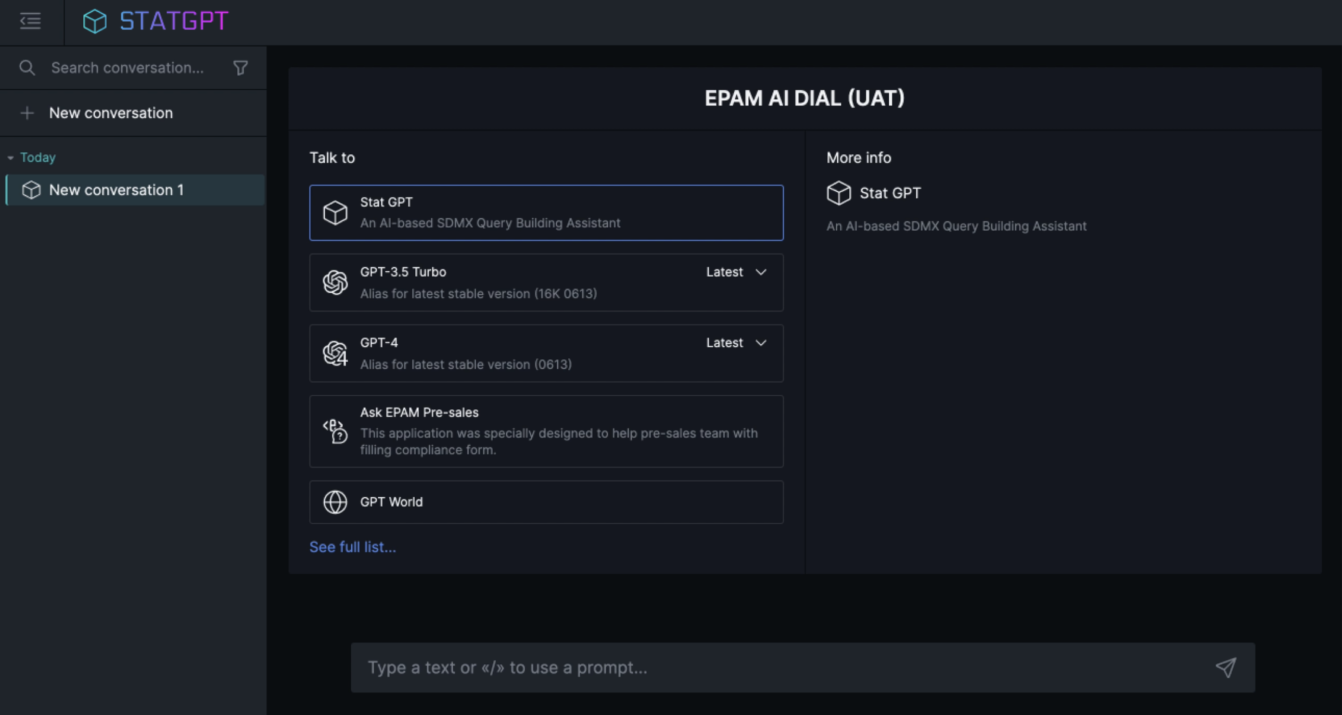
Narrow overlay
A narrow overlay hides the sidebar panels and shows a single conversation. This variant suits desktop application add-ins (for example, an Excel sidebar) and compact embedded widgets. Remove conversations-section and prompts-section from enabledFeatures to achieve this layout.
Events
Subscribe to overlay events to react to state changes in the embedded Chat:
const unsubscribe = overlay.subscribe(
  '@DIAL_OVERLAY/GPT_START_GENERATING',
  () => {
    console.log('Model started generating a response');
  }
);
The subscribe method returns an unsubscribe function. Call it to stop listening.
| Event | Fires when |
|---|---|
@DIAL_OVERLAY/GPT_START_GENERATING | The model begins generating a response. |
Deployment considerations
DIAL Chat in overlay mode should be a separate deployment from your main DIAL Chat instance. The overlay instance runs with IS_IFRAME=true and a restricted ALLOWED_IFRAME_ORIGINS, while the standalone instance runs without these constraints.
Both instances connect to the same DIAL Core backend and share access to the same models, applications, and storage.
Further reading
- Embed Chat with DIAL Overlay — step-by-step tutorial for integrating Overlay into a host page
- Theming and design — customize the color scheme and branding of the embedded Chat
- How DIAL Chat is configured — how Chat reads environment variables and where each group is documented
- Overlay library source and sandbox examples — upstream library code with a sandbox application for experimentation