Pipelines [Preview]
Navigate to Analytics → Pipelines to define the standing processes that read data from a source table and write derived data into a target table. A pipeline does not run once and finish: after you enable it, it keeps running on its trigger and processes whatever data arrives.
Use a pipeline when you want data that is not stored as such, for example:
- a daily rollup of a source table, so dashboards and queries read a small table instead of every row;
- a model-generated value for each row or group of rows, for example a sentiment label per support ticket;
- a derived column computed from other columns of the same row.
Pipeline types
A pipeline has a kind, and an Enrich pipeline also has a transform type.
| Kind | Type | What it does | Runs |
|---|---|---|---|
| Enrich | LLM transform | Sends data from the source to a model and writes the answer into columns of an enrichment table. | Per row on a Schedule, or per Group of rows. |
| Enrich | SQL transform | Computes columns of an enrichment table from SQL expressions over the source row. It calls no model. | On a Schedule or per Group, the same as LLM. |
| Aggregate | Form declaration | Groups the source rows by keys and computes measures, writing a rollup table. | On a cron Schedule. |
| Aggregate | SQL declaration | The same rollup, written as one INSERT INTO … SELECT … statement. | On a cron Schedule. |
Examples (illustrative; table and column names are yours to choose):
| Goal | Pipeline |
|---|---|
| Tickets per day | Aggregate, Form. Source support_tickets. Target tickets_per_day. One group key: created_at truncated to a day. One measure: ticket_count, function count. |
| Sentiment per ticket | Enrich, LLM. Target ticket_insights, an enrichment table on support_tickets. Model with a request template, an input bound to the ticket text column, and one output sentiment. |
| Label from existing columns | Enrich, SQL. Target an enrichment table. One output whose Produced by expression combines source columns. |
Rules that apply to every pipeline:
- A table can be the target of at most one pipeline. A table that is already a target is not offered in the Target list.
- Deleting a pipeline leaves the target table and its rows untouched.
- Creating, saving, enabling, resuming, backfilling, and deleting require full administrator rights. Other users see only the Properties and Audit tabs, read-only.
How a pipeline runs
Platform deployment and runtime controls are described in DIAL Analytics Enrichment Runner. The pipeline's enabled flag replaces operator pause: Admin offers no Pause control, and Resume applies only to a pause taken by the circuit breaker. Earlier Admin releases still show Pause, which the runner rejects.
There is no Run now button. A pipeline runs because it is enabled and its trigger fires.
- Create the pipeline: name, kind, and target. See Create a pipeline.
- Configure it on the Properties tab and Save. A disabled pipeline may be saved with an incomplete declaration. The service refuses the declaration when you enable it.
- Preview it on the Preview tab to see what it would write, without writing anything.
- Enable it. The pipeline starts running on its trigger. The runtime service takes an Enrich pipeline on within about a minute. Until then its status reads Not running. Click Reload on the Runtime tab to read it again.
- Monitor it on the Runtime tab. An Aggregate pipeline is run by the registry service itself and shows no runtime status.
- Operate it:
- Resume an Enrich pipeline that the circuit breaker paused.
- Backfill to replay a window of history through an Enrich pipeline.
- Queue evaluation for one group of a group-triggered pipeline.
- Retry failed rows of an LLM pipeline.
- Disable it to stop it running on its trigger. Its queued work is kept. A manual scan still works while it is disabled, but a backfill cannot start or resume until you enable the pipeline.
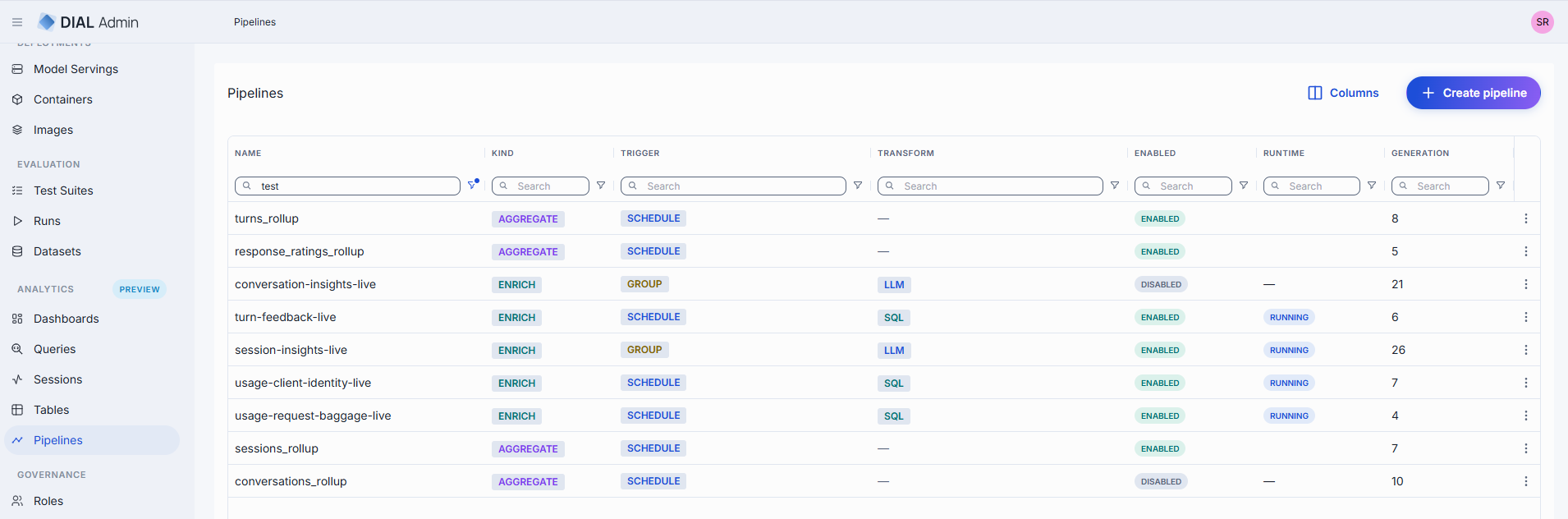
Pipelines grid
| Column | Description |
|---|---|
| Name | Pipeline identifier. Click to open the pipeline. |
| Kind | Enrich or Aggregate. |
| Trigger | Schedule or Group. |
| Transform | For Enrich pipelines, the transform type: LLM or SQL. |
| Enabled | Whether the pipeline is enabled. |
| Runtime | What the runtime service is doing with an enabled Enrich pipeline: running, paused, held, over budget, backpressured, or not running. |
| Generation | Increments each time the pipeline's declaration is saved. |
| Target | The table the pipeline writes to. Hidden by default. |
| Source | The table the pipeline reads. Hidden by default. |
| Updated at | Timestamp of the last change. Hidden by default. |
Use the Columns button to show the hidden columns. Every column can be sorted and filtered from its column menu.
Create a pipeline
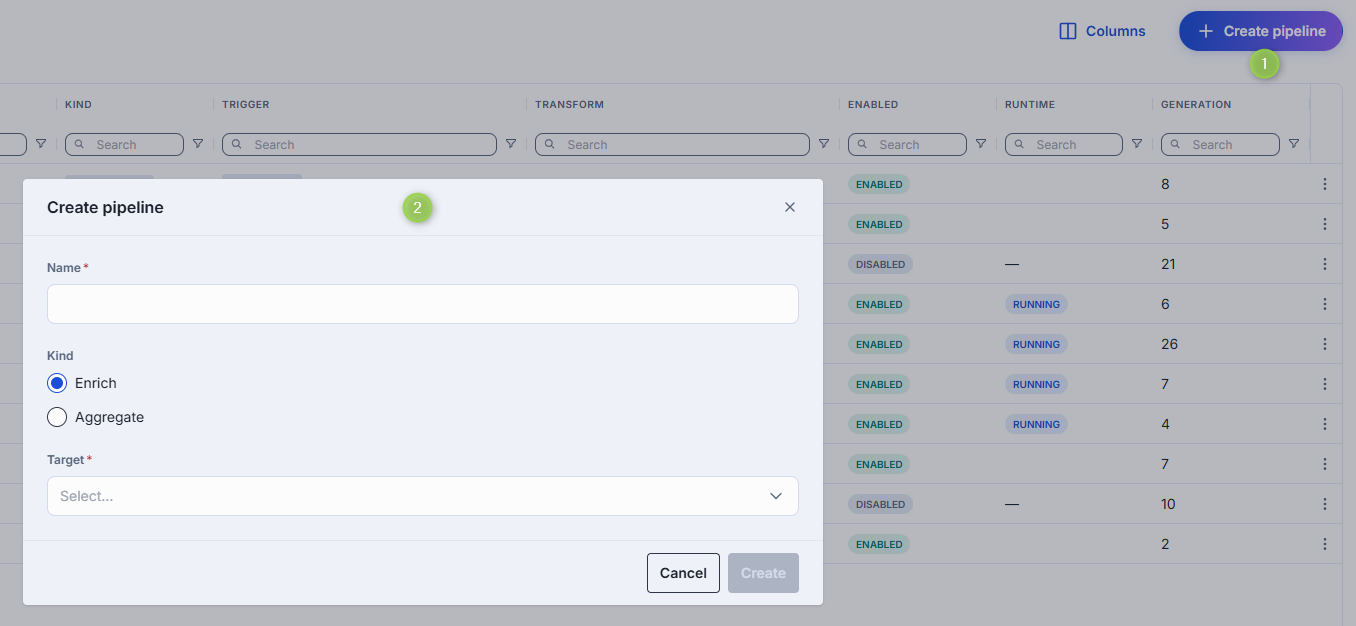
- Click Create pipeline (top-right).
- Enter a Name. The name is the pipeline's identity and cannot be changed afterwards.
- Choose the Kind: Enrich or Aggregate.
- Select the Target table. The list depends on the kind and offers only tables no other pipeline writes.
- Click Create. The pipeline opens on its page. Registration stores only the name, kind, and target. You then configure the rest and Enable it.
Pipeline page
Click any pipeline to open its page. The header shows the pipeline's name, an Enabled or Disabled badge, and for an Enrich pipeline a runtime status chip. Two statuses are shown separately because they are different things: enabled is the declaration, the runtime status is what the runtime service does with it.
| Control | Description |
|---|---|
| Enable pipeline / Disable pipeline | Starts or stops the pipeline on its trigger, after a confirmation. Save or discard your changes first. |
| Resume | Enrich only. Appears when the circuit breaker paused the pipeline. See Runtime. |
| Backfill | Enrich only. Opens the Backfill drawer. |
| Delete pipeline | Stops and removes the pipeline. The target table and its rows stay. For an Enrich pipeline the transform (prompt, parameters, outputs) is deleted with it. |
| JSON Editor toggle | Shows the whole declaration as one JSON document. See JSON Editor. |
| Save / Discard | Appear when you change a field. |
Under the header, alerts appear when they apply: a pause banner, a backfill banner, and for an Enrich pipeline the last run failure, a Rebuild needed warning (the enrichment it reads was rebuilt after the pipeline last wrote), and a Waiting for its input notice (the pipeline has read everything its input has written).
The tabs are Properties, Preview, Runtime, Groups (only for a group-triggered pipeline the runtime service holds groups for), and Audit. Users without full administrator rights see only Properties and Audit.
Properties
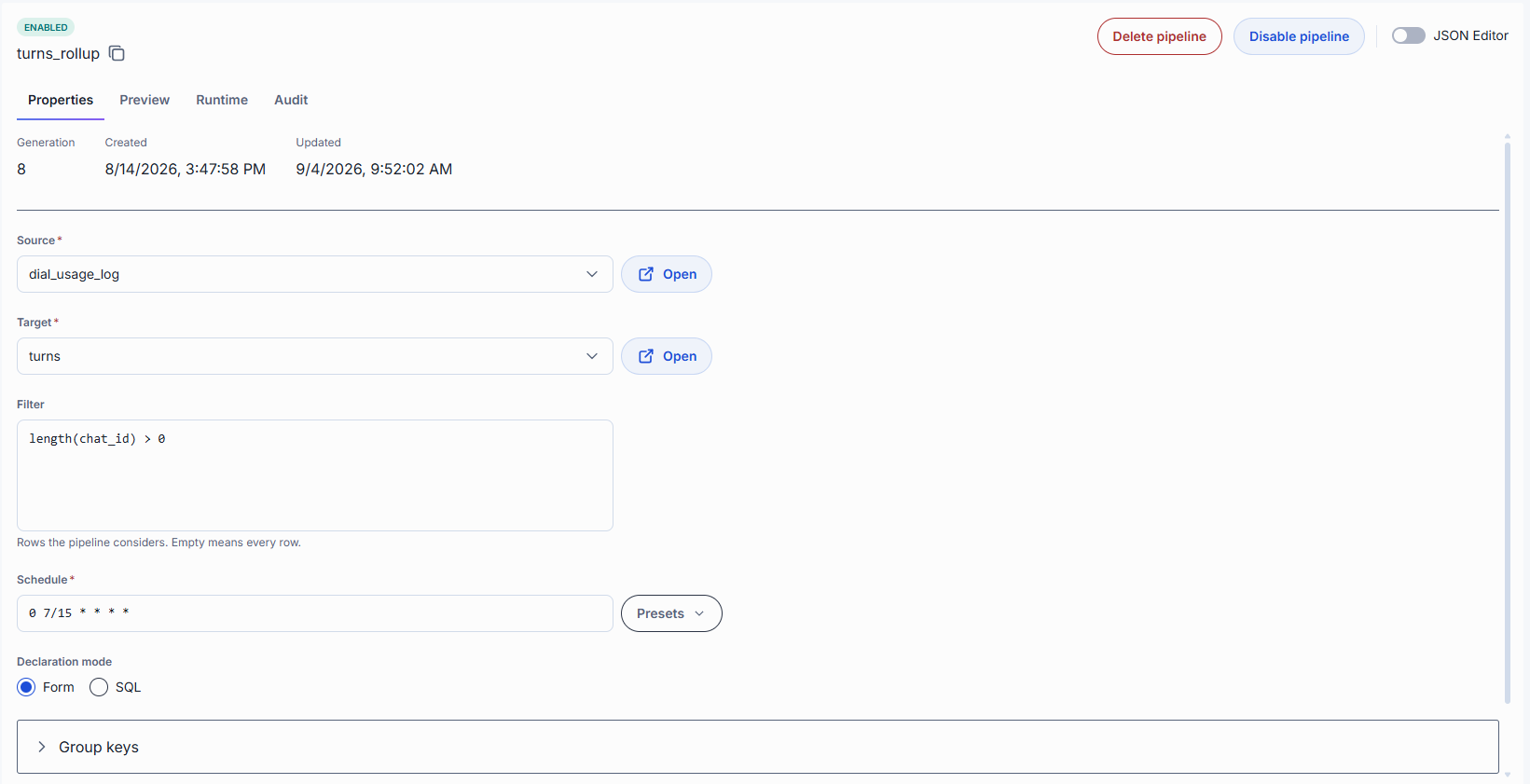
The Properties tab holds the declaration. Fields that change by kind are marked.
Facts derived by the service
Read-only values: Grain key and Version column (the target table's), Generation, Created, and Updated. A group trigger groups by the grain key.
Scope
| Field | Kind | Description |
|---|---|---|
| Source | Enrich | The table the pipeline reads. Follow target enrichment (the default) reads the source table of the target enrichment. Pick a source table to pin one. |
| Source | Aggregate | Required. The source table to roll up. |
| Target | Both | The table the pipeline writes to. |
| Filter | Both | A SQL condition selecting the rows the pipeline considers. Empty means every row. It is written over the columns of the source, with columns of its enrichments flattened in, and does not allow joins, subqueries, or CTEs. The service checks it when you save. In an Aggregate pipeline's SQL mode the field is hidden, because the SQL statement has its own WHERE. |
Trigger
An Enrich pipeline has a choice of trigger. An Aggregate pipeline always runs on a Schedule.
Schedule
| Field | Description |
|---|---|
| Schedule | A six-field cron expression: seconds, minutes, hours, day of month, month, day of week. A five-field expression is rejected, because it would be read as a different schedule. Choose a preset, or enter a custom expression. Presets: Every minute (Enrich only), Every 5 minutes, Hourly, Daily at midnight. |
For an Enrich pipeline the schedule is optional: when empty, the service uses an every-minute schedule. For an Aggregate pipeline the schedule is required.
Group
A group trigger processes rows that belong together (for example all rows of one chat) in one step.
| Field | Description |
|---|---|
| Group by | The column that identifies a group. It is prefilled with the target's grain key and should keep that value. If the source reaches the key through an enrichment, write it as enrichment.grain_key. |
| A group is ready when | At least one condition is required, otherwise a group never becomes ready and the pipeline never runs. Whichever happens first wins. |
| Member selection | Which rows of a ready group the transform receives. |
A group is ready when conditions:
| Condition | Description |
|---|---|
| it has gone quiet for | No new row for the chosen duration. Pick a preset or enter a duration such as 30m or PT30M. |
| a row marks it finished | A SQL condition over the source's columns, for example event_kind = 'conversation_end'. The group is ready as soon as a row satisfies it. |
| its result is older than | Evaluates the group again, even with no new rows, once its last result is older than the duration. |
| Stop after (cost ceiling) | Optional. A positive whole number: the maximum evaluations of the same group per day (UTC). Empty means no cap. It limits spending and does not decide readiness. |
Member selection choices:
| Choice | Description |
|---|---|
| All of them | Newest first, up to the deployment's configured maximum. |
| A selected few | Cheaper, and puts the most interesting rows first. Sets Preferred members, Order by, and Member limit. |
| Field | Description |
|---|---|
| Preferred members | A SQL condition. It is a preference, not a filter: when no member satisfies it, every member is a candidate. |
| Order by | One or more columns, each ascending or descending. The source's own order is appended last, so an unchanged group selects the same members. |
| Member limit | Required once member selection is declared. The maximum members fetched per group. It cannot exceed the deployment's configured maximum. |
Transform (Enrich)
Type is LLM or SQL. The fields below depend on the type.
LLM
| Field | Description |
|---|---|
| Model | The model that runs the transform. |
| Model parameters | Key-value settings passed to the model, such as max_tokens and temperature. |
| Request template | The request sent to the model, as JSON. Use placeholders written with double curly braces. For a per-row pipeline, a placeholder names an input. For a group pipeline the template must contain {{members}}, and may also use {{members_included}}, {{members_omitted}}, {{members_truncated}}, and {{members_notice}}. |
| Inputs | The values the template uses. Each input has a Name, a binding (Column or Transform (JSONata)), and a Value: the source column, or a JSONata expression. The editor marks placeholders that no input covers. In a group pipeline each input is a field of every member. |
| Outputs | What the model returns, one entry per target column. See below. |
The placeholders for a group trigger:
| Placeholder | Meaning |
|---|---|
{{members}} | The group's members. Required. Without it the prompt carries no group data. |
{{members_included}} | How many members the request carried. |
{{members_omitted}} | How many member selection left out. |
{{members_truncated}} | Whether a member was cut short to fit. |
{{members_notice}} | A ready-made sentence stating what was left out. |
Each LLM output has:
| Field | Description |
|---|---|
| Target column | The column that receives the value. System columns and columns used by another output are not offered. The column owns the type. |
| What the model is told | A description of the field for the model. Optional. It defaults to the column's description. |
| Refine with | Allowed values (a closed list; not offered when the column already declares its own enum values) or Transform (JSONata). Leave empty to take the model's field of the same name as is. |
The model fills the outputs in the listed order, so put a field after the ones it derives from.
SQL
A SQL transform has no model, parameters, request template, or inputs. It has only Outputs, one per target column:
| Field | Description |
|---|---|
| Target column | The column that receives the value. |
| Produced by | A required SQL expression over the source row. |
Advanced (Enrich)
Open the Advanced accordion to set throughput limits. All are optional.
| Field | Description |
|---|---|
| Rows per scan | How many rows each scan reads. |
| Rows per call | How many rows each transform call carries. |
| Rate limit (rpm) | The maximum calls per minute. |
| Sample fraction | The share of eligible rows to process: above 0 and up to 1. To process nothing, disable the pipeline. |
Declaration (Aggregate)
An Aggregate pipeline is declared in one of two Declaration modes. Choose Form or SQL. A new pipeline opens in Form mode. Switching mode discards what you wrote in the current mode and starts the other empty, with nothing converted. The page asks you to confirm.
Form
| Field | Description |
|---|---|
| Group keys | The columns the source is grouped by, in order. Leave empty to derive them from the target table's ordering key. Otherwise they must match it. Each key is The column itself or A truncated period (Period: hour, day, week, or month; hour only for a timestamp column, the others for a date or timestamp). Each key may have an Alias: the target column it writes. |
| Measures | The values computed for each group. |
Each measure has:
| Field | Description |
|---|---|
| Name | The target column the measure writes. |
| Function | An aggregate function from the list the service provides, limited to functions that take at most one column. |
| Column | The source column the function reads. It defaults to the measure's name, except for a count over rows. |
| Only over rows where | A SQL condition limiting the rows the measure sees. A measure that matches nothing yields null. |
| Aggregate | Optional distinct: aggregate each distinct value rather than every row. It needs a Column. |
SQL
| Field | Description |
|---|---|
| SQL declaration | One INSERT INTO target (columns) SELECT … statement into the pipeline's target. The service checks it when the pipeline is enabled or previewed, and refuses unsupported forms, for example joins and HAVING. Use SQL mode for rollups the Form cannot express, such as expression keys or expression measures. |
Saving
Saving replaces the declaration. The page blocks a save only for a value that is present and contradictory:
- a cron expression that is not six fields;
- a sample fraction outside 0 to 1, or a cost ceiling that is not a positive whole number;
- a member selection without a limit, or a group trigger with no readiness condition or no Group by;
- two outputs writing the same column, or a
distinctmeasure with no column.
Missing members are allowed on a disabled pipeline. The service refuses them when you enable it.
JSON Editor
Turn on the JSON Editor toggle to read or edit the whole declaration as one JSON document. This is the way to set a member the form does not offer. While the JSON editor is on, the tabs are hidden. A JSON document that does not parse blocks the save and reports where. Removing a member from the document removes it from the pipeline.
Preview
The Preview tab is a dry run. It shows what the pipeline would produce from real rows, writes nothing, moves no position, and works while the pipeline is disabled. It is offered to full administrators for every pipeline kind.
- Open the tab and click Run preview. Nothing runs until you click it.
- Read the result. Later visits show the last result with Run again.
The preview runs on the saved declaration. A banner warns when you have unsaved edits that the preview does not include, and another when the result is older than the pipeline's current generation.
| Pipeline | What the preview shows |
|---|---|
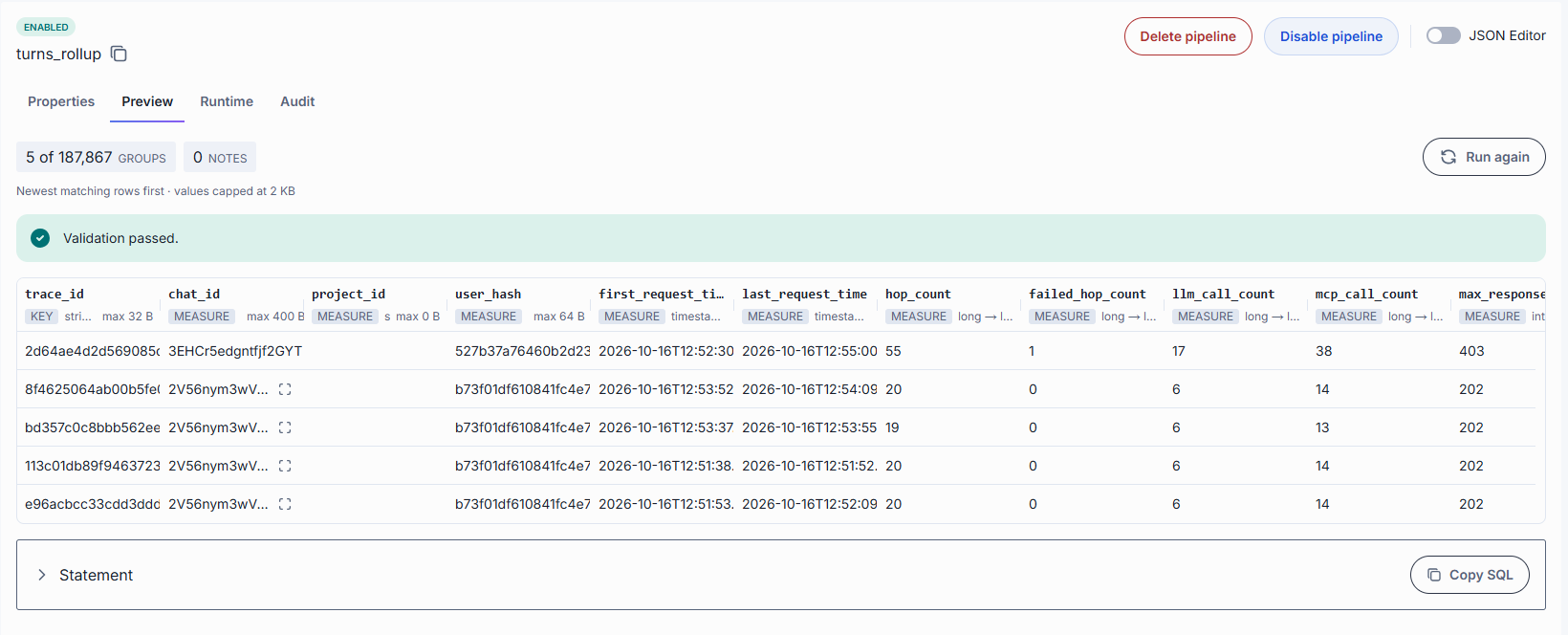
| Aggregate | The whole input grouped the way a refresh would group it: a sample of the resulting groups, with N of M groups. |
| SQL (Enrich) | The result of the pipeline's SELECT on up to 5 of the newest matching rows. |
| LLM, per row | The inputs the model would receive for up to 5 of the newest matching rows. The model is not called. |
| LLM, group | The members of one group as the model would receive them, up to 5. The service picks the group with the newest matching row. The model is not called. |
The result is a grid of the sampled rows. Each column header states the column's role (Key, Measure, Grain key, Output, Input) and its types. Values are capped at 2 KB. Above the grid, chips count the groups, sample rows, outputs, and notes. Below it:
- Notes from the service, with a severity, for example No matching rows, Waiting on an enrichment, Values may be narrowed (a value would be narrowed or wrapped to fit the target column), The group was cut by the fetch limit, and Output without a description.
- Statement (Aggregate and SQL pipelines): the
SELECTthat produced the sample, with Copy SQL. - Outputs (LLM pipelines): what the pipeline writes, from the saved declaration. No values are shown, because the model is not called.
Preview runs the same checks as enabling, so a declaration problem appears as Fix the declaration before previewing, one problem at a time. If the tab says No data yet or No matching rows, check the source and the Filter and run again. If you see You can't preview this pipeline, your role is not allowed to run previews.
Runtime
The Runtime tab shows what the runtime service is doing with an Enrich pipeline and lets you keep it healthy. For an Aggregate pipeline it shows only the registry's own state: schedule and position.
Runtime status
| Status | Meaning |
|---|---|
| Running | The runtime service has taken the pipeline on and schedules it. It does not mean rows are moving this second. |
| Paused | Paused by the circuit breaker. |
| Held | Waiting on the registry across a contract change. |
| Over budget | Over its daily spend budget. It continues the next UTC day. |
| Backpressured | Holding back because its queue is full. It continues when the queue drains. |
| Not running | The runtime service does not hold the pipeline. Normal for a minute after enabling or saving. If it persists, the service cannot execute the declaration, and its log names the reason. |
Resume
The dead-letter circuit breaker pauses a pipeline that keeps failing. A banner shows while it is paused, with the age and reason, and when it lifts. Input keeps arriving. Click Resume to lift the pause earlier, and the backlog is worked through. The pipeline stays enabled and its declaration is unchanged. Note:
- A pause is a runtime action. It is not recorded as a change to the pipeline.
- A pause does not survive a restart of the runtime service.
- To stop a pipeline on purpose, disable it. Its queued work is kept.
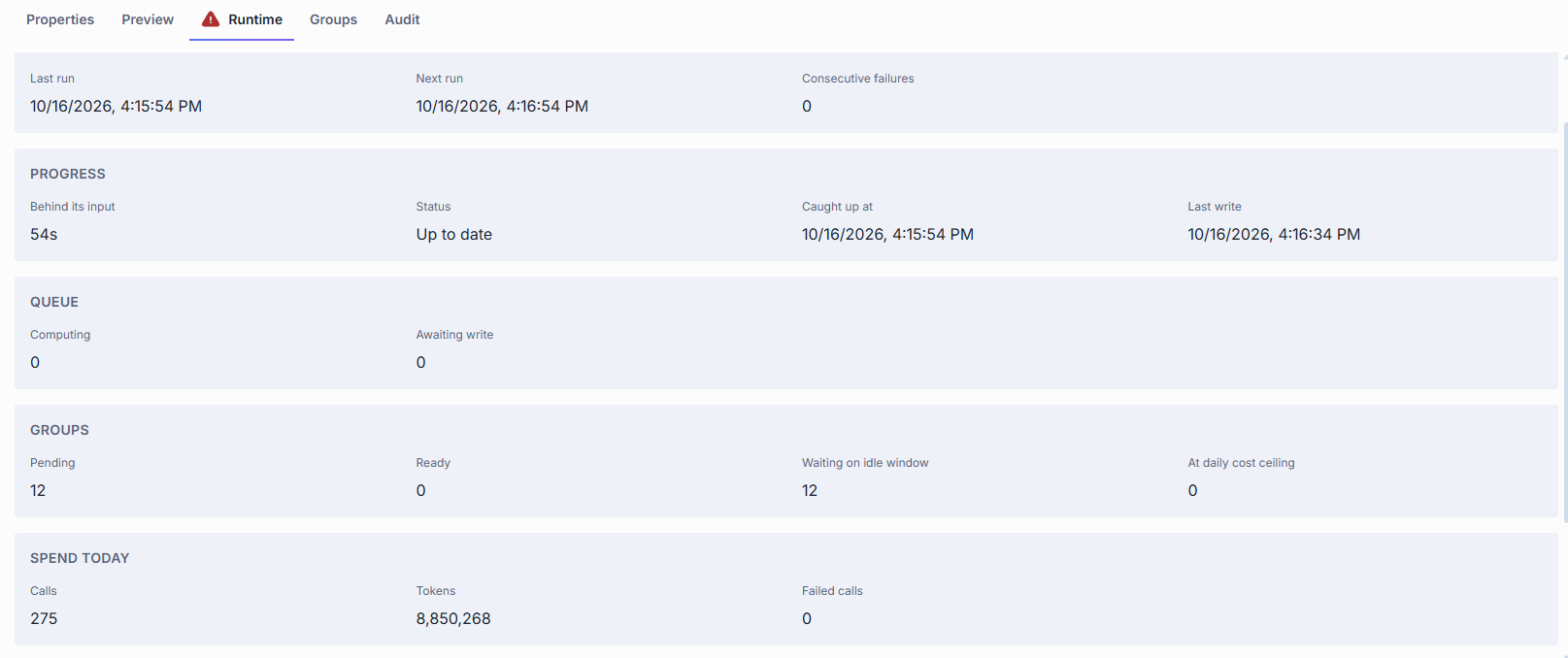
Cards
| Card | Description |
|---|---|
| Schedule | When the pipeline last ran and when it runs next, consecutive failures, and the last error. |
| Progress | Behind its input (lag), Status (Up to date or Catching up), Data up to, Caught up at, and Last write. A lag of zero while the queue still holds items is normal. |
| State | The cursor and materialized-through positions (version and identity), and Drained at. |
| Queue | Items Computing and items Awaiting write. |
| Groups | For a group pipeline: groups Pending, Ready, Waiting on idle window, and At daily cost ceiling. |
| Spend today | Calls, Tokens, and Failed calls for the current UTC day. |
Failures
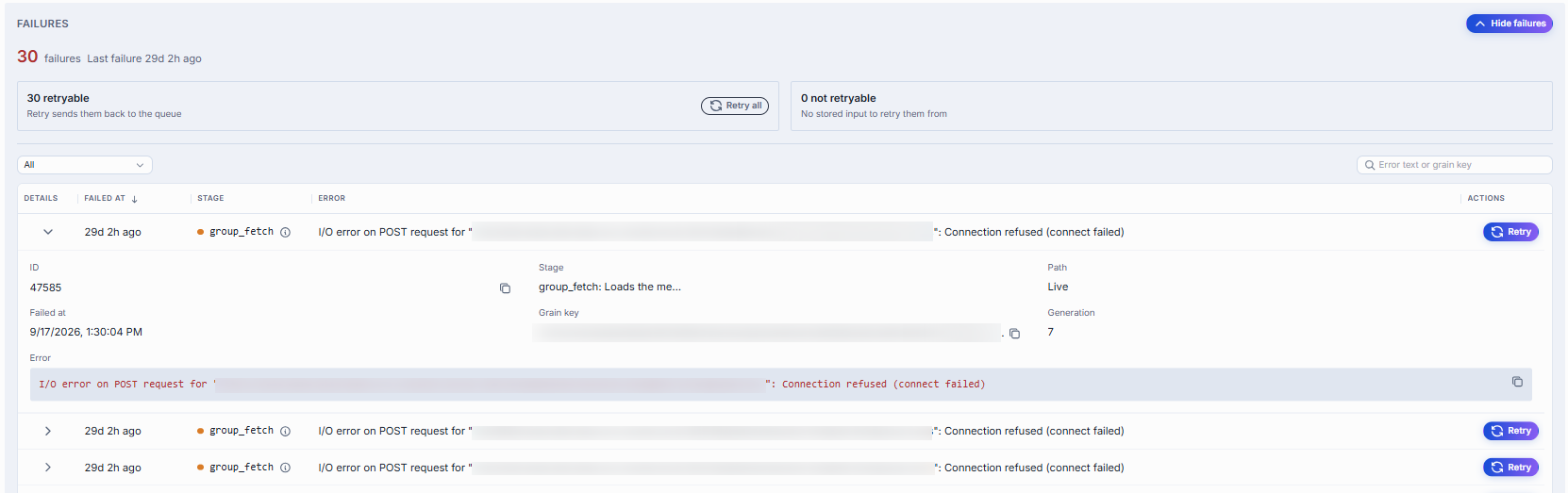
Only LLM pipelines record failed rows. A SQL enrichment and an Aggregate pipeline are all-or-nothing, so they have no failures list. Failed rows are kept in a dead-letter list.
| Item | Description |
|---|---|
| Stage | Where it failed: building the request from the row, calling the model through DIAL Core, validating the answer against the output schema, mapping the answer onto target columns, writing to the target, or, for a group trigger, loading or mapping the group's members. |
| Scope | What a retry re-runs: a Chunk (every row in it), a Row (that row alone), or a Write (the write-back, from rows already computed). |
| Path | Live or Backfill: which kind of run produced it. |
| Retry, Retry all | Send the failures back to the queue. Retry all includes failures the list is not showing and ignores the filters. Retried items compete with live work, and wait while the pipeline is paused. |
Filter the list by Path and Run, or search by error text or grain key.
Groups
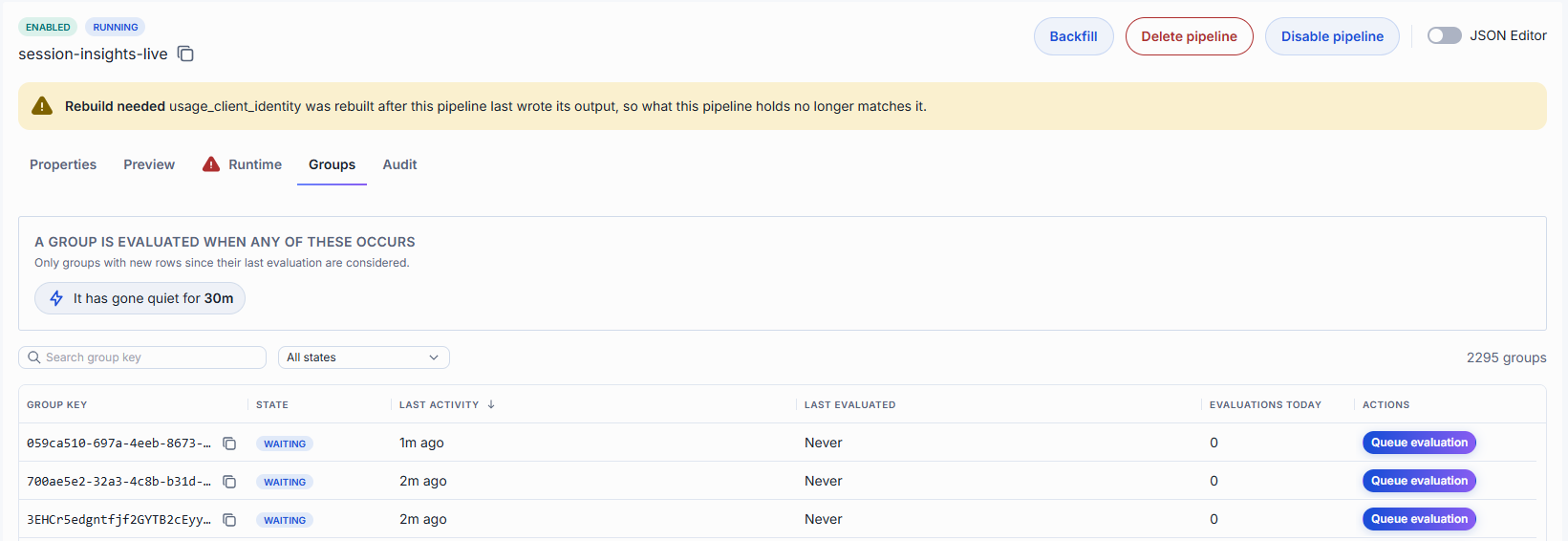
The Groups tab is offered for a group-triggered pipeline that the runtime service holds groups for. It shows the Readiness rule (the conditions from A group is ready when) and a grid of groups.
| Column | Description |
|---|---|
| Group key | The group's value of the Group by column. |
| State | Up to date, At cap, Ready, or Waiting. |
| Last activity | When the last row arrived. |
| Last evaluated | When the group was last evaluated. |
| Evaluations today | Evaluations in the current UTC day. |
| State | Meaning |
|---|---|
| Up to date | The last evaluation saw every row the group now holds. |
| At cap | The group reached the cost ceiling for the day. It resumes at 00:00 UTC. |
| Ready | At least one readiness condition holds. The runtime service takes it on its next pass. |
| Waiting | The group has new rows, but no condition holds yet. |
Click a group to see which conditions are Met or Not met. Use Queue evaluation to evaluate the group now without waiting for its triggers. That spends a model call, even if no rows have arrived since the last evaluation, and counts toward the daily ceiling. It works while the pipeline is paused. It is unavailable at the cap.
Backfill
Backfill replays a window of history through an Enrich pipeline, for example after you change its declaration. Click Backfill in the pipeline header to open the drawer. The button is offered to full administrators once the runtime service has answered for the pipeline.
- Under New backfill, set From and To. These are whole UTC days and both are included. The window cannot end in the future. There is no length limit and no option to replay everything.
- Click Start backfill.
Only one backfill runs per pipeline at a time. While one is running or paused, a banner appears above the tabs, and the start form is hidden. A pipeline that evaluates groups reports Queued where others report Done: the run marks groups, and evaluation follows the pipeline's schedule.
| Run state | Meaning |
|---|---|
| Running, Paused | In progress, or paused by an operator or by its pipeline. |
| Queued | Groups are marked for evaluation, and evaluation follows on the schedule. |
| Done, Failed, Cancelled | Finished. |
The run shows its Run ID, Window, Started, Finished, and Rows done. Use Pause, Resume, and Cancel backfill. A cancelled run cannot be resumed: rows it already processed stay processed, and you start a new run to cover the rest. Resume is unavailable while the pipeline itself is paused, so resume the pipeline first. A run pauses on its own when its pipeline is paused, the daily spend budget is used up, the pipeline is disabled or deleted, or its definition changed mid-run.
A finished run with failed rows shows Dead letters and Requeue failed rows, which re-runs only that run's failures. Recent runs lists the latest runs.
This is separate from the table-level Backfill data button on the Tables page, which re-ingests raw logs into source tables.
Audit
The Audit tab records configuration changes to the pipeline (available when the Admin API is enabled).
Further reading
- Tables — define the data Analytics works with
- Queries — ask your own questions of the data
- Dashboards — monitor usage, cost, and errors
- Sessions — investigate individual conversations