DIAL Architecture
Introduction
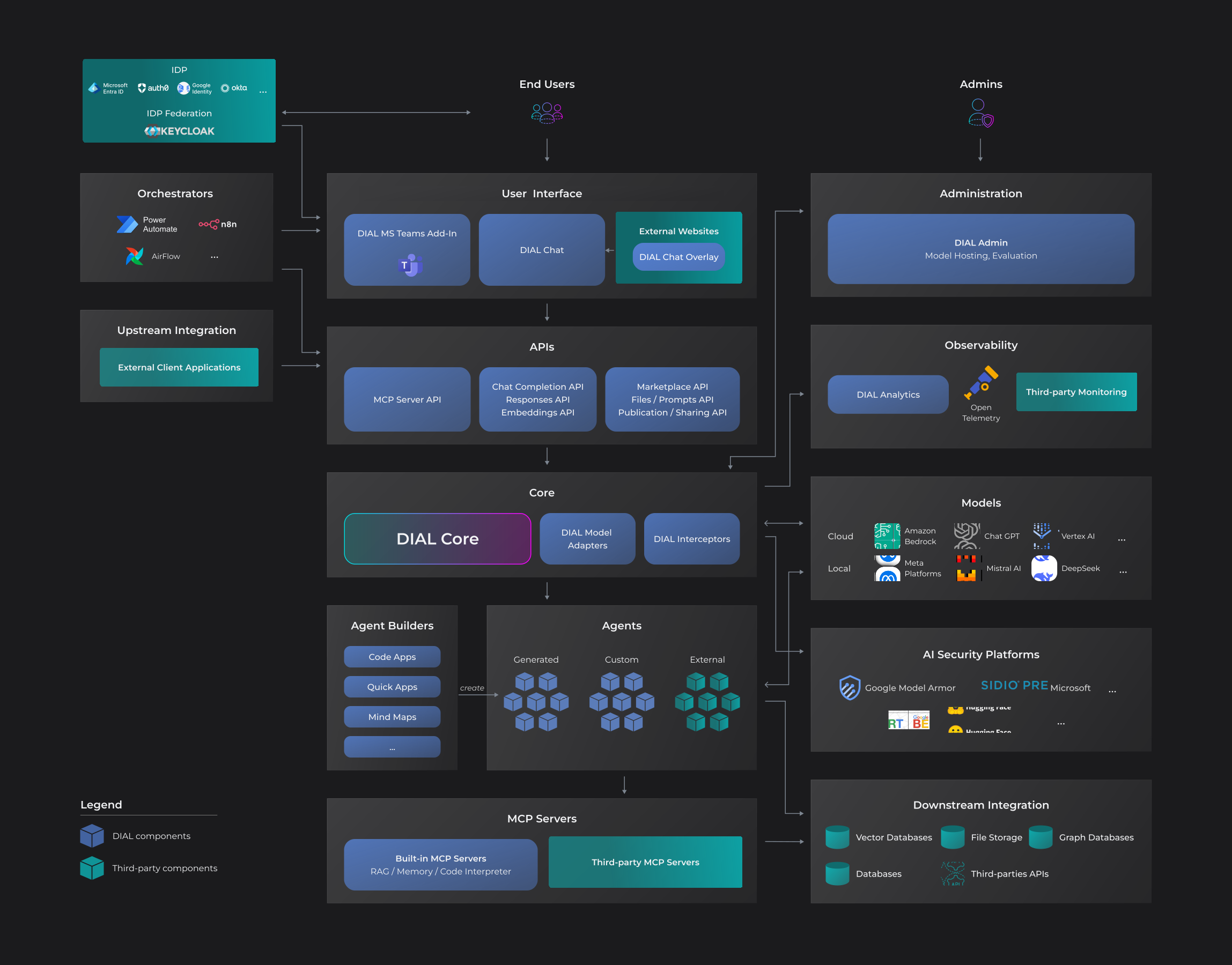
DIAL is an enterprise-grade AI platform with modular architecture allowing organizations to deploy components based on their requirements—from a minimal single-component setup to a full-scale production deployment.
DIAL is an open platform designed to maintain small technological footprint and avoid vendor lock-in, enabling seamless integration with external GenAI applications, other AI-enabling systems, custom libraries and frameworks on any cloud or chosen environment. The platform's OpenAI-compatible API enables integration with existing tools and workflows while providing centralized governance, access control, and observability across all AI resources.
- Refer to Stack to find out about resources required to deploy DIAL.
- Refer to Deployment to discover platform deployment highlights
Components
DIAL's modular design lets you start small and scale as needed. The only required component is DIAL Core—you can run a minimal setup on your laptop to try out the platform and understand how it works. When you're ready for production, you'll typically add DIAL Chat for the user interface and model adapters to connect to your AI models.
DIAL Core (required)
DIAL Core is the central integration hub and the only mandatory component of the DIAL platform. DIAL Core seamlessly integrates with all your GenAI applications and agents, regardless of their original platform.
Key features:
- Unified API: A single and OpenAI-compatible API that standardizes communication between clients, AI models, and applications enabling unified, secure and governed access to platform tools and features. Refer to APIs to learn more.
- LLM Gateway: A unified gateway to language and embedding models from all major and alternative vendors
- Load Balancing: Intelligent algorithms enabling creation of custom and flexible mechanisms of load distribution across model deployments, regions, and cloud subscriptions
- Auth: Enables centralized attribute and role-based access control to all resources with granular permission management
- Cost Management: DIAL Core enables comprehensive usage and cost control by allowing configuration of token usage, request limits, and monetary costs—customizable for individual users, groups, or API keys
- Interceptors: Add custom logic to in/out requests for models and apps, enabling PII obfuscation, guardrails, safety checks, and beyond
- Observability: DIAL leverages OpenTelemetry (OTEL) to provide comprehensive system observability with a vendor-agnostic approach to collecting and analyzing telemetry data
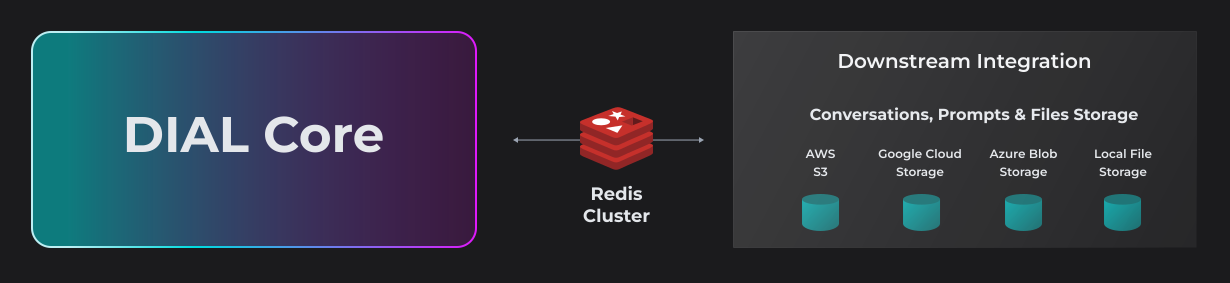
Minimizing technical footprint and dependence on specific vendors, DIAL architecture includes a persistent layer, that relies on a resilient and scalable cloud blob storage (you can configure either AWS S3, Google Cloud Storage, Azure Blob Storage or a local file storage) where all conversations, prompts, custom applications and user files will be stored. Redis Cache (either cluster or a standalone) is deployed on top of it to enhance retrieval performance. This architecture facilitates swift retrieval, sharing and publication of stored objects.
- Refer to DIAL Core GitHub repository to access source code and additional documentation.
- Refer to Core to learn more about DIAL Core and its features.
- Refer to DIAL Core API Reference to access API documentation.
APIs
Unified Completion API
DIAL Core provides a single Unified API, based on OpenAI API, for accessing all language models, embedding models and applications. The key design principle is to create a unification layer that allows all models and applications to be interchangeable, delivering a cohesive conversational experience and future-proof development of custom GenAI applications.
Key features:
- Streaming: Real-time token-level response delivery via server-sent events, enabling low-latency conversational experiences.
- Token usage (even in the streaming mode): Accurate token consumption reporting, including during streaming, for cost and quota management.
- Seeds: Support for seed parameters enables deterministic, reproducible outputs.
- Tools: Specialized utilities that streamline development by implementing standardized methods for LLMs to access external APIs.
- Multi-modality: Support for non-textual communications such as image-to-text, text-to-image, text-to-video, image-to-video, video-to-video file transfers and more.
- Interactive controls: Support for interactive controls in AI-generated response such as buttons, dropdowns, checkboxes and more for richer user interaction.
- Custom renderers: Ability to define custom renders for conversation chats using any visualization library.
- Stages: Ability to render steps AI agent has taken to generate the response.
- State management: Ability for maintaining and passing application's and AI model's state across requests.
- Configuration management: Ability to leverage application-specific configuration in the request.
- Attachments: Ability to accept and produce file attachments by applications.
Other APIs
- Embedding API: Unifies access to any embedding model from the HuggingFace leaderboard supporting all essential features, asymmetric models (e5-large-2), Instruct models (gte-Qwen1.5-7B-instruct), multi-modal embeddings.
- MCP Server API: MCP-based communication using HTTP transport.
- File storage management API: Enables access and management of files in the DIAL file storage.
- APIs to manage DIAL resources: Applications, Prompts, Conversations, Toolsets.
- Collaboration APIs: Publications API and Sharing API.
- refer to API reference to learn more.
AI Model Adapters
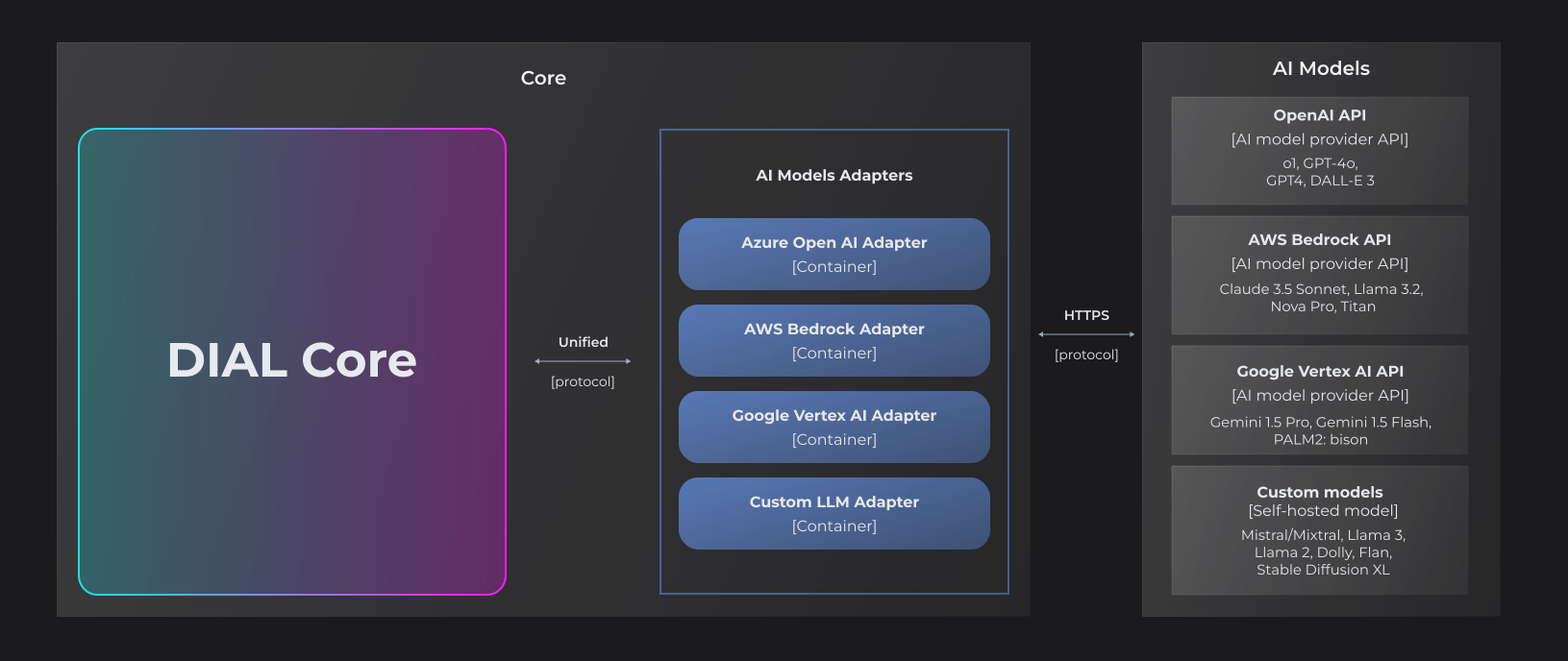
DIAL AI Model Adapters translate provider-specific AI model APIs into DIAL's OpenAI-compatible unified protocol. This normalization allows applications to interact with any AI model through a consistent interface, regardless of the underlying provider's native API format.
DIAL includes adapters for major LLM providers:
Organizations can develop custom adapters using the DIAL SDK to integrate additional AI model providers or proprietary models.
Refer to DIAL SDK for adapter development documentation and examples.
AI Models
DIAL provides access to AI models from multiple sources:
- Major LLM providers: Azure OpenAI, AWS Bedrock, Google Vertex AI, and other commercial providers
- Open-source models: Models from the open-source community, including those hosted on Hugging Face
- Self-hosted models: Custom or fine-tuned models deployed in your own infrastructure
- Specialized platforms: Models from NVIDIA NIM, DeepSeek, and other AI model platforms
Refer to Supported Models for the complete list of available models.
MCP Servers
DIAL integrates with Model Context Protocol (MCP) servers to extend AI application capabilities with external tools and data sources. MCP is an open protocol that standardizes how AI applications connect to external services, enabling applications to access functionality beyond their core language model capabilities.
DIAL supports two integration approaches:
- External MCP servers: Connect DIAL toolsets to existing MCP servers hosted outside the platform and use them as tools to perform specific actions in agentic workflows such as querying databases, accessing APIs, reading files, or executing specialized computations through standardized MCP interfaces.
- Custom MCP server deployment: Deploy and manage custom MCP servers as Docker containers through DIAL Admin.
- Refer to Admin to learn how to deploy and use custom MCP Servers via Docker images.
- Refer to DIAL Chat User Guide to learn how end users can add custom toolsets leveraging external MCP servers.
- Refer to DIAL Core API to discover documentation for programmatic usage of toolsets.
Interceptors
DIAL supports custom interceptors that can leverage external AI security platforms (Google Model Armor, Presidio, Bert, Hugging Face and more) and specialized AI models to process requests and responses flowing through the system.
Interceptors operate at the DIAL Core level, analyzing traffic before it reaches AI models/applications (incoming requests) and before responses return to users (outgoing responses).
Interceptors enable security capabilities such as:
- PII detection and redaction: Identify and mask personally identifiable information
- Content filtering: Block inappropriate, harmful, or policy-violating content
- Prompt injection detection: Identify potential security threats in user inputs
- Compliance enforcement: Apply organizational policies and regulatory requirements
Organizations can develop custom interceptors using the DIAL Interceptors SDK to integrate their preferred AI security solutions.
- Refer to Interceptors to learn more.
- Refer to Interceptors SDK GitHub repository to access examples and documentation.
Agent Builders
Agent Builders (technical name application runners) can be seen as factories that enable end users to create customized AI applications from predefined templates without writing code. Users configure application parameters through a UI-based workflow, then deploy and share the resulting applications with other users and groups.
For example, a custom RAG application builder may allow an end user to configure a personalized RAG agent by connecting it to chosen data sources, such as internal knowledge bases, document repositories, or external APIs. The resulting RAG application becomes available as a reusable resource that can be invoked by other users with appropriate permissions.
Standard application runners:
DIAL includes pre-built application runners:
- Quick Apps: No-code agents’ orchestrator conceptually similar to OpenAI's GPTs that streamlines the creation of multi-agent workflows via no-code UI editors.
- Code Apps: Code Apps allow you to develop, deploy and run Python applications directly in the DIAL Chat UI in a safe environment.
- Mind Maps: DIAL Mind Maps enable deterministic information discovery and research through visual, interactive knowledge graphs built from your trusted sources.
Custom application runners:
Organizations can develop custom application runners using the DIAL SDK to create domain-specific application templates tailored to their use cases.
Refer to DIAL SDK to learn about creating custom application builders.
Admin
DIAL Admin provides system administrators with an intuitive, user-friendly UI to configure and manage system resources, implement and adjust access control policies, moderate publication requests from users, and monitor the entire system at various levels of granularity.
Key features:
- Model and application management: Self-host, configure, manage and monitor your applications and AI models
- Deployment management: Deploy and manage Docker images for AI model adapters, interceptors and MCP servers. Deploy model servings
- Interceptors: Add interceptors enabling PII obfuscation, guardrails, safety checks, and beyond on system and deployment levels
- MCP servers: Self-host and manage MCP servers and instances available in your DIAL environment
- Access control: Add and manage roles, API keys and access to your file storage
- Publication workflow: Moderate publication requests for apps, prompt, files and toolsets from users across your organization
- System monitoring: Monitor activity and system vitals to identify and resolve issues before they become critical at both deployment (e.g. application or AI model) and system levels
- Usage and cost control: Add and manage requests, tokens and cost limits for roles and API keys to control consumption across the organization
Refer to Admin Panel for detailed documentation on its features.
DIAL Chat
DIAL Chat is the default feature-rich web-based end user interface for the DIAL platform, marketplace for agents and tools, and a no-code development workspace in a single application with enterprise-grade access control, extendable functionality and ability to add custom GenAI applications.
Key features:
- Conversational interface: Interact with AI models, applications, and agents; manage conversations, prompts, and files
- Marketplace: Browse and access AI models, applications, and tools both private and shared across the organization
- Application builders: Create and configure AI applications using no-code/low-code tools (Quick Apps, Code Apps, Mind Maps)
- Collaboration: Share and publish conversations, prompts, and applications with users and groups
- Customization: Apply custom themes, logos, and branding
- Advanced rendering: Execute code securely and display visualizations, charts, markdown, and LaTeX
- Extensibility: Support for custom application interfaces, including non-conversational
- Refer to DIAL Chat GitHub repository for source code and technical documentation.
- Refer to About Chat for feature details and configuration options.
- Refer to User Guide for end-user documentation.
Chat Overlay
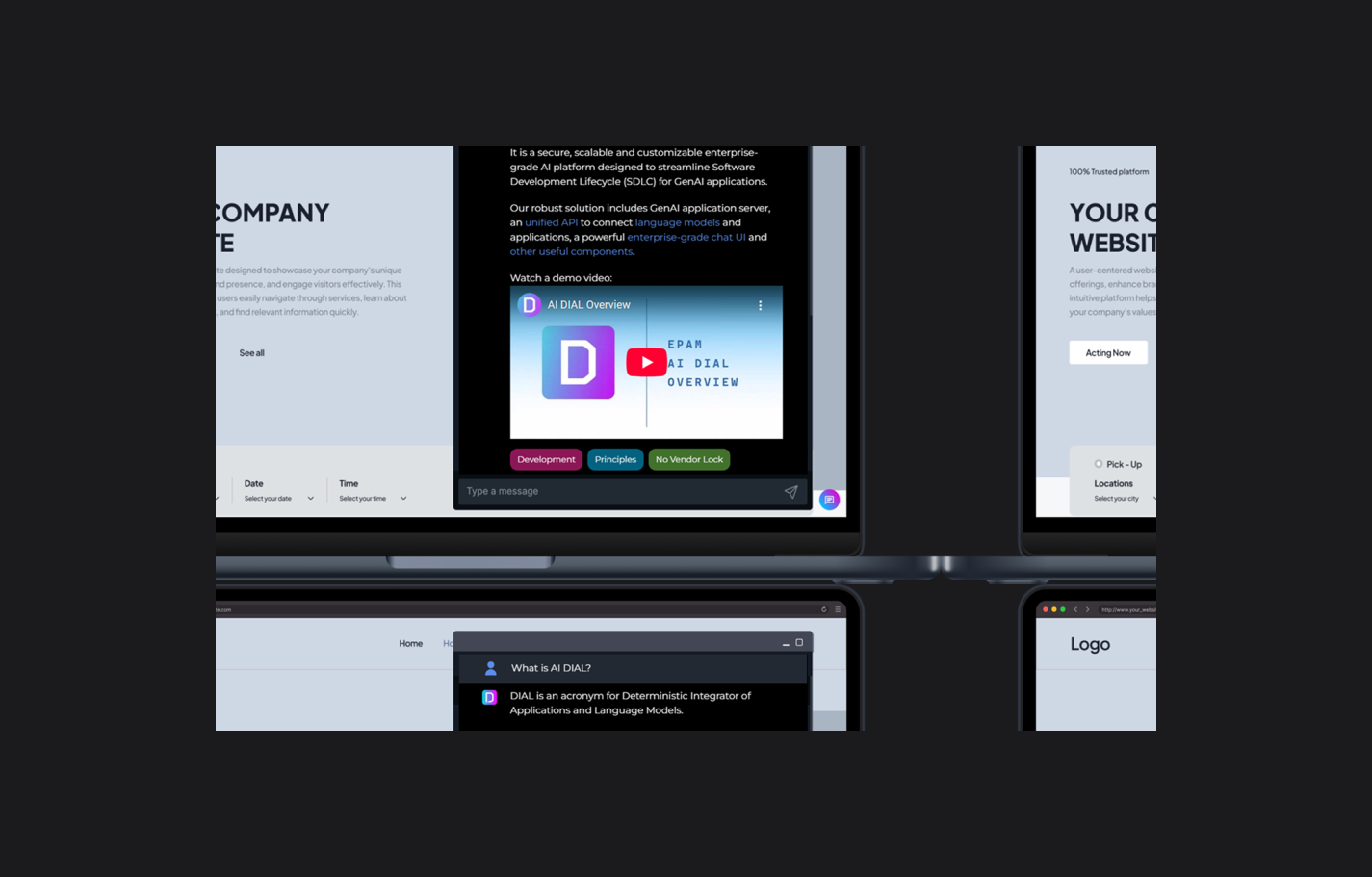
Chat Overlay is a library that allows using DIAL Chat via an iframe event-based protocol.
Refer to Chat Overlay Documentation for integration examples and configuration options.
DIAL Bot for MS Teams
DIAL provides a Microsoft Teams bot that enables users to securely access DIAL AI models and applications directly within the MS Teams interface. The bot eliminates the need to switch between applications, allowing users to interact with AI capabilities in their existing collaboration environment.
Key features:
- Users can access DIAL models and tools directly within MS Teams conversations
- The bot gives access to selected DIAL features including AI model selection, conversation management, and playback
- Access conversations, prompts, files stored in DIAL
- Share AI-generated output with colleagues
- Authenticate users using the organization's configured identity provider and respecting access control policies
Refer to DIAL Integration with Microsoft Teams for implementation highlights.
Orchestrators
DIAL's OpenAI-compatible API enables seamless integration of DIAL components with business workflow orchestration and process automation platforms—such as Power Automate, n8n, and Airflow—allowing organizations to incorporate AI capabilities into multi-step automated workflows and business processes.
Refer to Integration of DIAL with n8n to learn how DIAL can be integrated with n8n via a custom node.
Upstream and Downstream Integrations
DIAL exposes an OpenAI-compatible API that external clients can use to programmatically access AI models, applications, and platform resources.
DIAL applications can integrate with external systems and data sources required for their execution logic.
Applications built with DIAL SDK can connect to:
- Data sources: Relational databases, data warehouses, REST APIs
- Vector databases: Pinecone, Weaviate, Qdrant, ChromaDB for retrieval-augmented generation (RAG)
- File storage: Cloud storage services, document management systems
- Graph databases: Neo4j, Neptune for knowledge graph operations
- Third-party APIs: Weather services, payment gateways, enterprise systems, and other external services
You can use DIAL SDK to create custom applications.
Identity Providers
DIAL provides native support for OpenID Connect (OIDC) and OAuth 2.0 authentication protocols, enabling integration with enterprise identity providers (IDPs). Organizations can configure their preferred IDP to manage user authentication, define roles and attributes, and implement custom access control policies.
DIAL supports integration with major identity providers:
For organizations requiring additional IDP options or more complex identity management scenarios, DIAL can integrate with Keycloak, which acts as an identity broker supporting a broader range of authentication providers and protocols.
Refer to Identity Provider Configuration Overview for guidance on selecting and configuring identity providers.
Analytics
DIAL Analytics Realtime processes chat completion logs to extract and analyze usage insights and operational metrics without storing sensitive user information. The tool applies embedding algorithms, clustering techniques, and lightweight language models to analyze conversation patterns and extract statistical summaries.
Privacy-preserving architecture: Analytics Realtime operates as a data sink for Vector (an open-source observability data pipeline) and processes conversation data in real-time without persisting user prompts, responses, or personally identifiable information. Only computed statistical artifacts are stored in time-series databases such as InfluxDB for analysis and visualization.
Available metrics and insights:
- User analytics: Anonymized user activity (hashed identifiers only, no personal data)
- Topic analysis: Subject matter categorization of conversations
- Pattern detection: Identification of recurring themes and usage patterns
- Sentiment analysis: Emotional tone classification of interactions
- Cost tracking: Token usage and associated costs per model/application
- Language detection: Conversation language distribution
- Unique user counts: Active user statistics over time periods
- Any other calculated statistics based on conversations.
Analytics results can be visualized using standard observability platforms such as Grafana, enabling administrators to monitor platform usage, identify trends, and optimize resource allocation.
- Refer to DIAL Analytics Realtime GitHub repository for implementation details.
- Refer to Analytics Configuration and Usage to learn more about configuration and usage of this service.
Observability
DIAL leverages OpenTelemetry (OTEL) to provide comprehensive system observability across all platform components. OpenTelemetry is a vendor-agnostic framework for collecting, processing, and exporting telemetry data including metrics, logs, and distributed traces.
DIAL empowers you with:
- Unified observability: Collect metrics, logs, and traces from all DIAL components through a single standardized framework
- Backend flexibility: Export telemetry data to any OTEL-compatible observability platform without vendor lock-in
- System insights: Analyze collected metrics and traces to monitor system behavior and identify performance bottlenecks
- Standardized instrumentation: Leverage OpenTelemetry's established standards for consistent telemetry data collection across the platform
Refer to Observability and Monitoring to learn more.