Connect Claude Cowork to DIAL
In this tutorial you point Claude Cowork, Anthropic's desktop agent, at DIAL through its third-party inference setting and watch a DIAL-hosted model reply. Claude Cowork speaks the native Anthropic Messages API, and DIAL exposes that same API at /anthropic — so you configure a gateway connection in the app's UI, add your DIAL deployments, and send a message. This tutorial is for developers who already have a DIAL host.
Prerequisites
- A DIAL host and API key. See Before you begin.
- Claude Cowork installed. See Step 1.
What you'll build
Claude Cowork routing every turn through DIAL. By the end, you pick a DIAL deployment in the app and get a reply answered by your DIAL host, with DIAL's roles, quotas, and cost tracking applied.
Step 1: Install Claude Cowork
Download the installer for your platform from claude.com/download, run it, and launch the app.
Verify:
The app opens and shows the Claude menu bar.
Step 2: Enable Developer Mode
Third-party inference lives behind Developer Mode. In the Claude menu, select Help → Troubleshooting → Enable Developer Mode.
The app restarts to apply the change.
Verify:
After the restart, a Developer menu appears in the menu bar.
Step 3: Open the third-party inference settings
In the Claude menu, select Developer → Configure Third-Party Inference…. The Configure third-party inference window opens.
Step 4: Configure the connection to DIAL
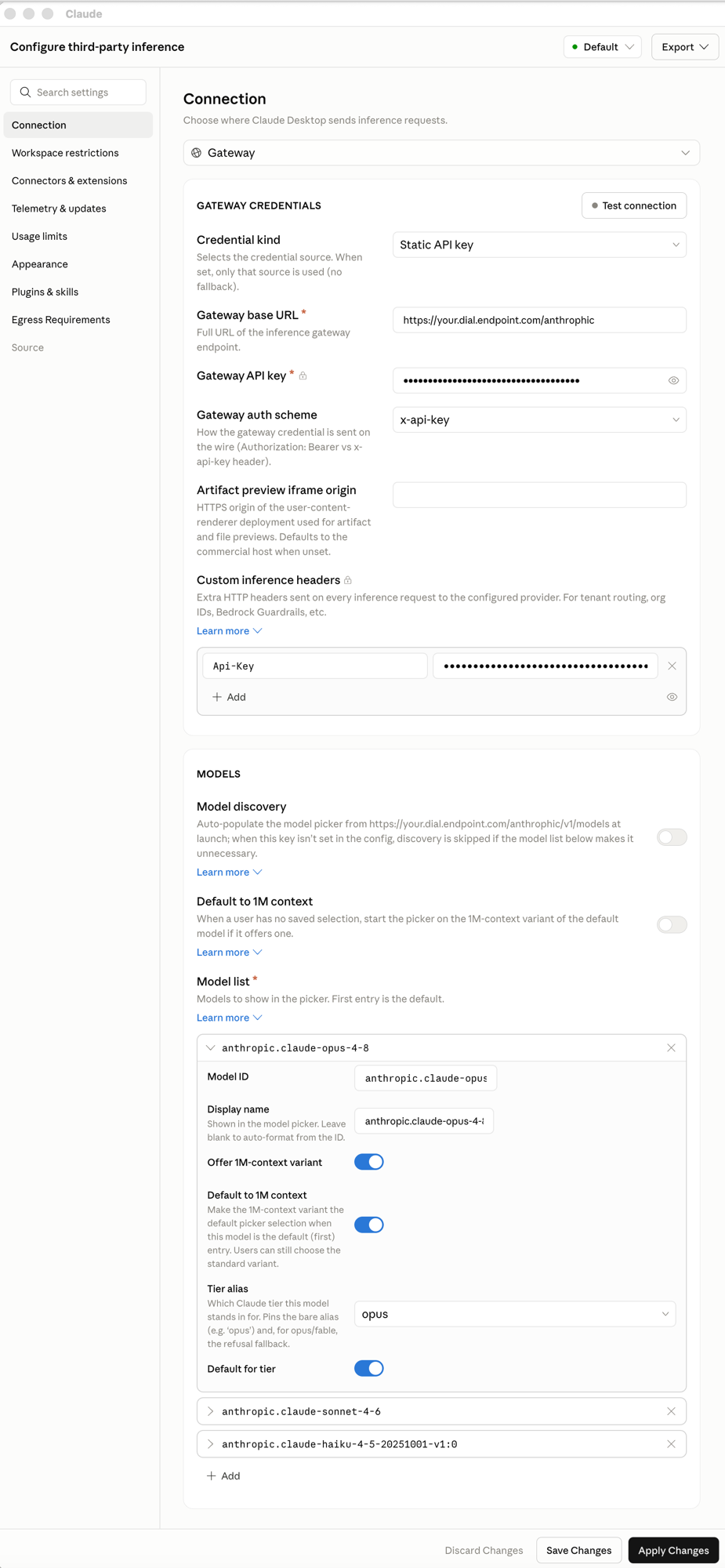
Under Connection, choose Gateway, then fill in Gateway credentials:
| Setting | Value |
|---|---|
| Credential kind | Static API key |
| Gateway base URL | https://<YOUR_DIAL_HOST>/anthropic |
| Gateway API key | <DIAL_API_KEY> |
| Gateway auth scheme | x-api-key |
DIAL does not authenticate on the x-api-key header that the gateway scheme sends. Add the header DIAL actually reads under Custom inference headers:
| Header | Value |
|---|---|
Api-Key | <DIAL_API_KEY> |
Your window should look like this:
Warning
Set the
Api-Keycustom header, not just the gateway API key. DIAL authenticates on theApi-Keyheader, so without it every request is rejected with401 "At least API-KEY or Authorization header must be provided".
Step 5: Add your DIAL models
Under Models, keep Model discovery off — DIAL does not support it yet, so you list deployments by hand. Add each deployment to the Model list. The first entry is the default. Use the exact DIAL deployment id for each — Claude Cowork sends it to DIAL unchanged.
| Model ID | Tier alias |
|---|---|
anthropic.claude-opus-4-8 | opus |
anthropic.claude-sonnet-4-6 | sonnet |
anthropic.claude-haiku-4-5-20251001-v1:0 | haiku |
Set a Tier alias on each so the app maps its Opus, Sonnet, and Haiku tiers to your deployments, and mark the first entry as Default for tier. Leave the 1M-context toggles off unless the deployment offers a 1M-context variant.
Step 6: Save and test
Select Test connection in the Gateway credentials section — a valid setup reports success. Then select Apply Changes.
Open a new conversation, pick a DIAL deployment, and send a message — for example, "What model are you?"
Verify:
You get a reply answered by your DIAL deployment.
What you learned
- How to enable Developer Mode and open Claude Cowork's third-party inference settings.
- How to point the app at DIAL's
/anthropicsurface with a gateway connection. - Why DIAL needs the
Api-Keycustom header for authentication. - How to add your DIAL deployments and map them to the app's model tiers.
Good to know
- The
Api-Keycustom header does the real authentication. Thex-api-keygateway scheme is sent too, but DIAL ignores it — the custom header is what DIAL reads. - Use exact deployment ids, and set all three tiers. The app routes small background tasks to the Haiku tier, so a missing or wrong Haiku deployment fails those turns. Haiku's full id is
anthropic.claude-haiku-4-5-20251001-v1:0— a shortened form is rejected as an unknown deployment. - Model discovery must stay off. DIAL does not support the
/anthropic/v1/modelsdiscovery endpoint yet, so the app cannot auto-populate the picker — list every deployment manually in the model list. - Tool calling and vision work only when the chosen DIAL deployment advertises those capabilities.
- Other DIAL releases may not expose
/anthropic. To check,POSTtohttps://<YOUR_DIAL_HOST>/anthropic/v1/messages— a configured host returns200, one without the surface returns404.
Next steps
- Connect Claude Code to DIAL — point Anthropic's command-line agent at the same
/anthropicsurface - Agentic tools overview — shared prerequisites and the other tools
- Unified API reference — the API DIAL exposes